A hospitality CRM that already knows who came in
Every booking lands on the guest’s record, walk-ins and no-shows included, because the CRM and the diary are one system. Birthday and win-back emails send themselves, and each campaign shows the bookings that followed it. It is part of the £100 a site.
Your own login to our four-site demo group, in your inbox in about a minute, for 14 days. Nick rings everyone who tries it.
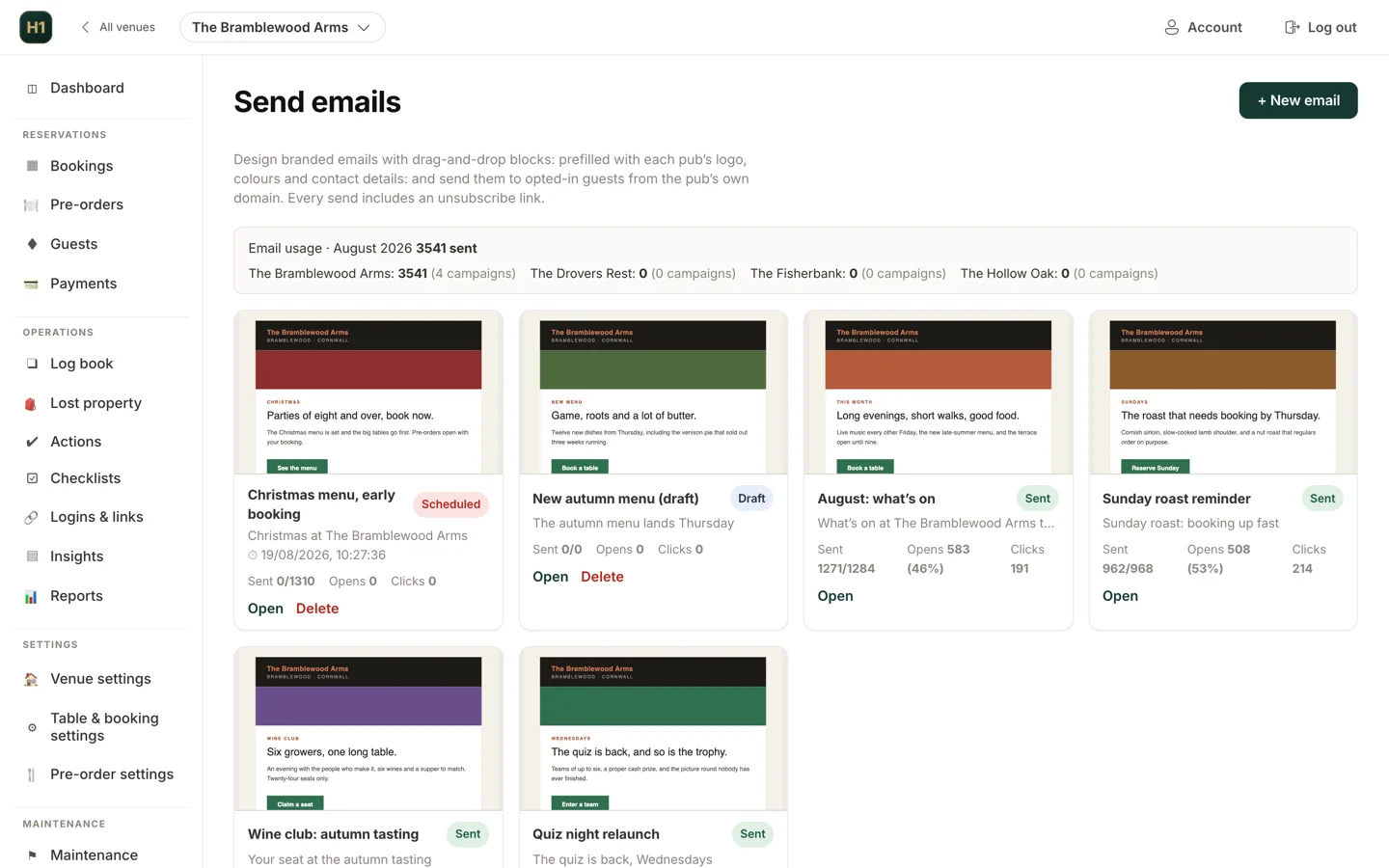
Email campaigns at the Bramblewood Arms, our demo pub
One guest record across every venue you run
Someone who books your restaurant in town in March and your country pub in August is one guest, with both visits on one record.
Visit history that builds itself
Tags, notes and dietaries
Unique guest numbers
Duplicate detection that never auto-merges
Company-wide or site-only views
Exportable, always
Who has drifted off, and who you are allowed to email
No list to build: every segment, from VIPs to guests who booked but never came, is kept current and ready to send to.
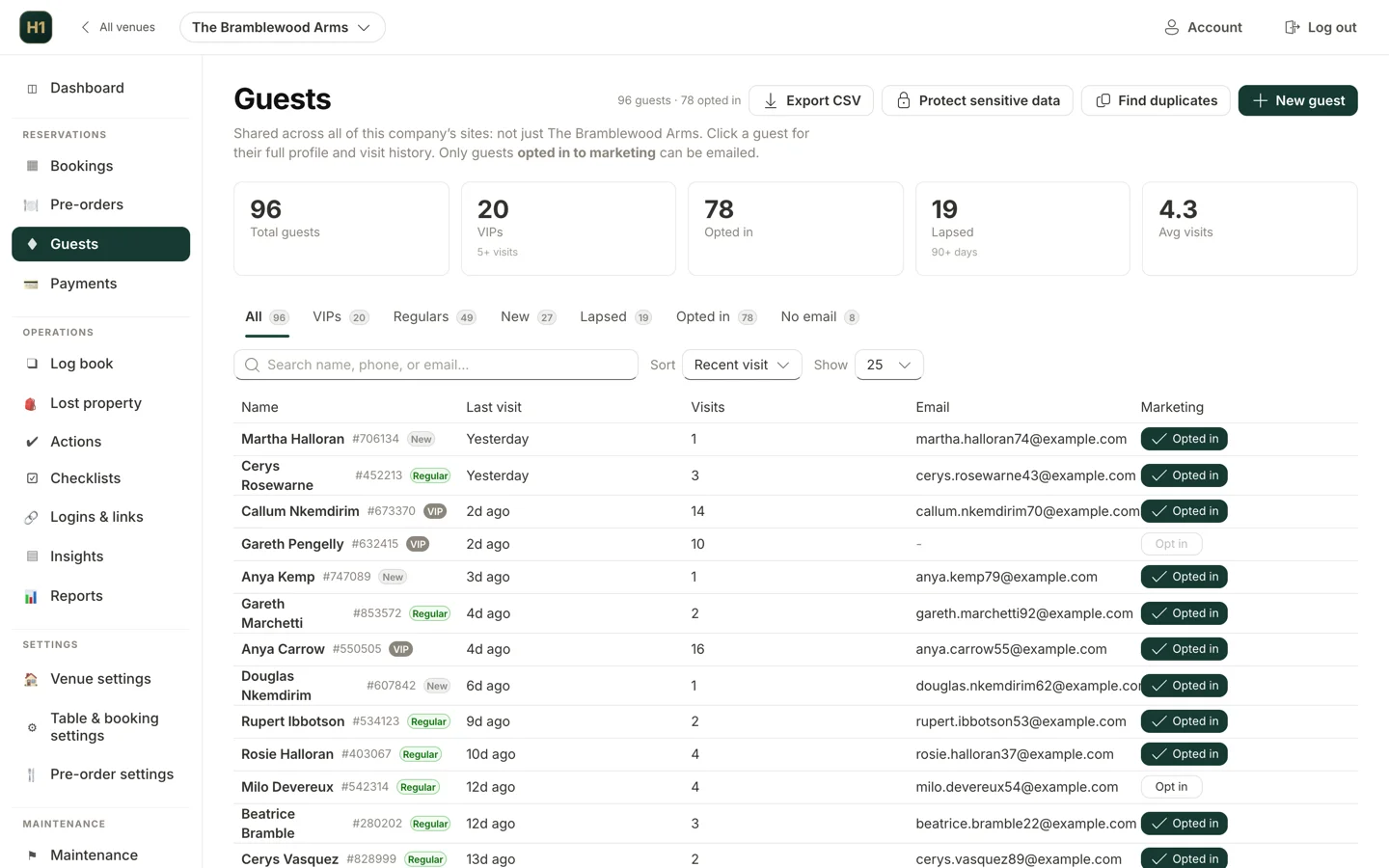
Segment counts along the top, every guest and their consent below
Segments that keep themselves up to date
A list exported on Monday is stale by Friday. These recalculate whenever you look, so Thursday’s campaign reaches Thursday’s lapsed guests.
Opted in, and no email
By site, or across the group
By tag
By visit recency and count
Automated campaigns that send on their own
Set each of the eight triggers up once; it sends within your quiet hours and skips anyone who has opted out.
Lapsed guests
Birthdays, including in advance
Visit milestones and every Nth visit
First-visit welcome
Post-visit thank-you
Tag-based
Birthday emails that send themselves
Watch 29 seconds of the demo pub setting one up: an offer a week before each birthday, with a code that works once. Then sign in and try it yourself.
What the film shows
- A birthday email at the Bramblewood Arms: a week before the day, with time to book.
- Every guest gets their own code: it works once, for 30 days.
- The email comes ready-made, with the code in it. Change the words if you like.
- Switch it on, and send yourself a test.
- What Alex gets: their own code and the date it runs out. Staff mark it used at the till.
See which emails filled a table
Bookings are the number worth having, and most hospitality email marketing tools never see the booking.
Bookings from every campaign
Single-use voucher codes
Honest campaign stats
Drag-and-drop campaign builder
Feedback with guest recovery
Review requests, timed sensibly
GDPR consent records, and deleting a guest properly
A venue’s data handling usually goes wrong at the mailing list, a spreadsheet nobody owns. Here consent sits on the guest record and erasure is a button.
Consent recorded, with the evidence
Unsubscribe on every send
Subject access and erasure
Why a restaurant CRM beats a mailing list
Most restaurants, pubs and hotels that do hospitality email marketing use a general email tool and a list typed up from a sign-up sheet by the till. The list goes stale and its segments are guesswork. There is rarely a record of how anyone opted in.
A CRM attached to the booking system fixes that, whether you call it a hospitality CRM or just the guest database. Visit history builds itself as you take bookings, and consent is timestamped when the guest books.
In Hendra One the booking system writes to the guest database, shared by every site under one head office, and it comes in the flat £100 per site per month with no separate marketing software on top.
Hospitality CRM questions
What is a restaurant CRM?
A restaurant CRM, or hospitality CRM, is a guest database that records who has visited, how often, what they spent time on and what they told you, and then lets you contact them lawfully. The difference from a general mailing list tool is that the visit history comes from your booking system automatically, so the segments are real rather than self-reported.
Is the guest database shared across all our sites?
Yes. One guest record spans the whole company, so a guest who books at two of your venues is one person with one visit history, not two half-records. Each site still sees its own bookings, and permissions control who can see the company-wide view.
Do we own the guest data?
You do. You are the data controller and Hendra One is your data processor, working strictly on your instructions under a Data Processing Agreement. Your guest list can be exported at any time, and it is never something we can independently market to or take away.
How does it handle GDPR and unsubscribes?
Consent is recorded on each guest with when, where and how it was given, every marketing email carries an unsubscribe link that takes effect immediately, and there are built-in tools for subject access exports and right-to-erasure requests. Automated emails check opt-out status before they send.
Can we tell which campaigns actually brought people back?
Yes. A booking made through a campaign’s own Book button is credited to that email, and its report also counts the bookings made within a week by guests it reached, however they booked, with the covers and, where the site imports its till takings, an estimate of what they spent. Clicks and opens are counted once per guest. Put a single-use voucher code on an email too and you can see how many were redeemed.
The rest of Hendra One
All of it is in the same £100 a site.
Try it on four busy sites
Leave your details and we’ll email you your own login to Bramblewood Inns, a demo group of four sites with a full diary, rotas, guest list and compliance records. Use every screen as your team would for 14 days, and Nick will ring to see how you are getting on.